Jonathan Noyce
Hello there,
Microtonic standalone has become unresponsive.
I'm using a MacBook Pro M4 running Tahoe 26.4.1. Microtonic version 3.3.4.
The app had been running perfectly smoothly standalone until a couple of weeks ago. The point at which things changed coincided with plugging in a new USB to Midi cable and connecting to a midi keyboard.
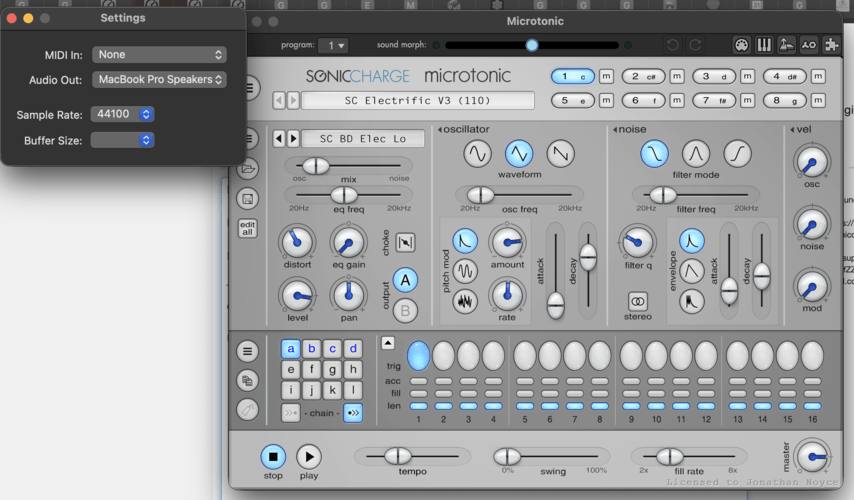
Upon launching Microtonic all controls except stop and play respond. There is no output.
Upon opening device settings (see attached screenshot), the buffer size is blank. If I try and select a buffer size or change the sample rate, or try and quit, Microtonic becomes unresponsive and I have to force quit.I have tried reconnecting the usb/midi cable to a device to see if it changes anything, and it doesn't. Microtonic doesn't see it or react.
I have uninstalled then reinstalled both the app and the authenticator. No change.
Any assistance will be most appreciated. I miss my Microtonic.
I've attached a screenshot of the app with the device setting window.
FLTR
I'd try to remove it (with something like App Zap that clears preferences and attached files) and then re-install it
Jonathan Noyce
Thanks for your advice. Still no luck I'm afraid.
Fredrik Lidström
Try removing the standalone application preference file. You can find it in your
~/Library/Preferencesfolder, and it's calledcom.soniccharge.microtonic.plistJonathan Noyce
Thank you very much Fredrik. This worked. Am now back up and running.
You need to be signed in to post a reply